Working with APIs in Python: Requests and REST APIs
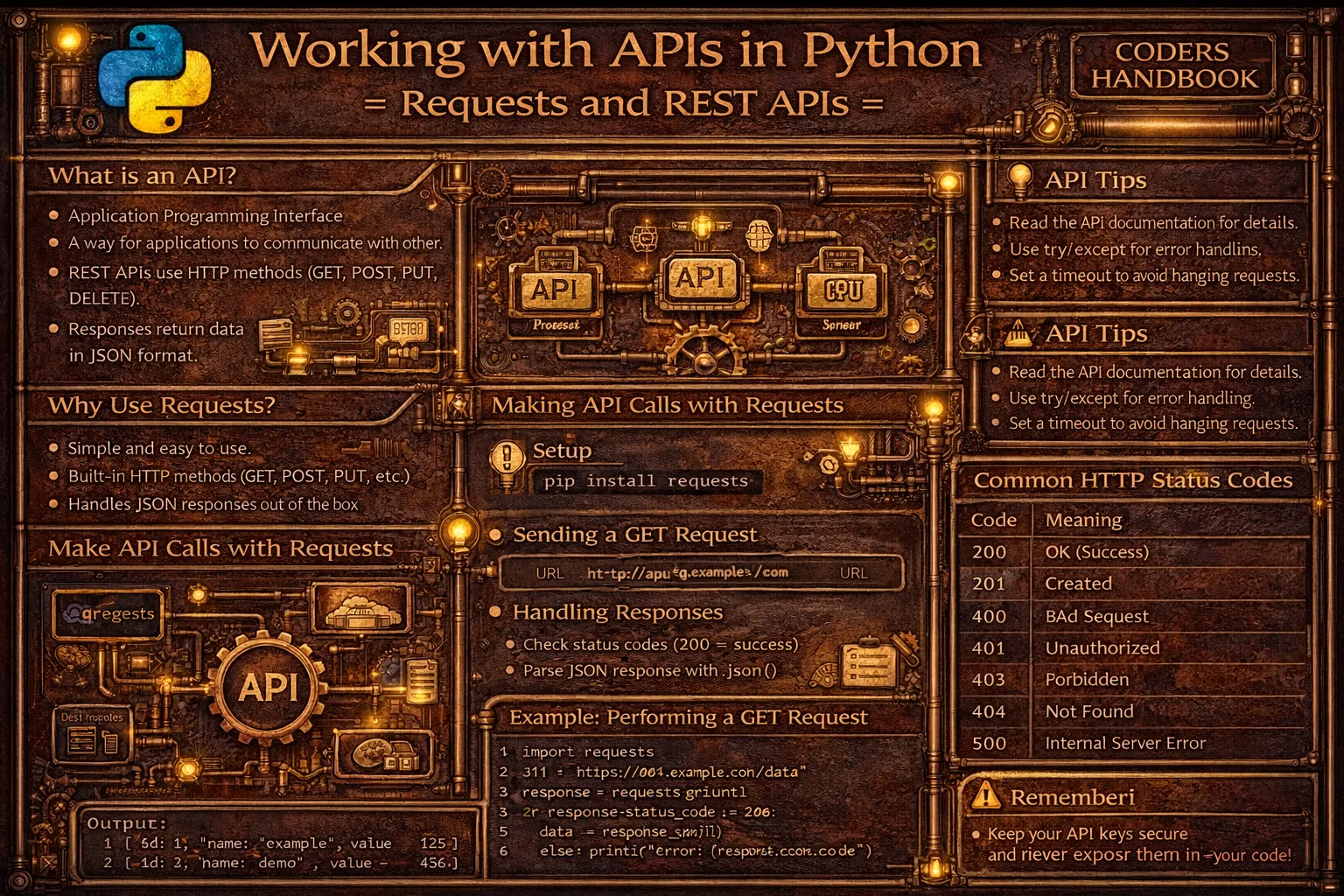
Working with APIs (Application Programming Interfaces) is fundamental to modern Python development, enabling applications to communicate with external services, retrieve data, and integrate functionality from web services. The requests library is Python's most popular HTTP client providing intuitive interfaces for making HTTP requests to REST APIs (Representational State Transfer APIs) following standard conventions. REST APIs use HTTP methods including GET for retrieving data, POST for creating resources, PUT for updating, DELETE for removing, and PATCH for partial updates, with responses typically formatted as JSON (JavaScript Object Notation) providing structured data easily parsed in Python.
This comprehensive guide explores making GET requests with requests.get() retrieving data from APIs with optional query parameters, handling responses checking status codes indicating success or errors and parsing JSON with response.json(), making POST requests with requests.post() sending data to servers with JSON payloads or form data, PUT and DELETE requests for updating and removing resources, query parameters passing data in URLs using params dictionary, request headers customizing requests with User-Agent, Content-Type, and custom headers, authentication methods including Basic Auth with auth parameter, Bearer tokens in Authorization header, and API keys in headers or query parameters, handling errors checking status codes and using response.raise_for_status(), timeout settings preventing indefinite waits, session objects maintaining state across multiple requests, practical examples consuming public APIs like weather services or GitHub API, and best practices handling rate limits, implementing retry logic, validating responses, and securing API credentials. Whether you're building applications consuming third-party APIs, integrating payment gateways, fetching weather data, interacting with social media platforms, or creating microservices communicating via REST, mastering the requests library and API integration patterns provides essential tools for modern Python development enabling seamless communication with external services.
Making GET Requests and Handling Responses
GET requests retrieve data from APIs without modifying server state. The requests.get() function accepts URLs and optional parameters, returning Response objects containing status codes, headers, and content. Understanding response handling including status code checking, JSON parsing, and error handling enables robust API integration.
# Making GET Requests and Handling Responses

import requests
import json

# === Basic GET request ===

response = requests.get('https://api.github.com')

print(f"Status Code: {response.status_code}")
print(f"Content Type: {response.headers['Content-Type']}")
print(f"Response Text: {response.text[:200]}...")  # First 200 chars

# === Checking status codes ===

response = requests.get('https://api.github.com/users/python')

if response.status_code == 200:
    print("Success!")
elif response.status_code == 404:
    print("Resource not found")
elif response.status_code == 500:
    print("Server error")
else:
    print(f"Unexpected status: {response.status_code}")

# === Parsing JSON responses ===

response = requests.get('https://api.github.com/users/python')

if response.status_code == 200:
    data = response.json()  # Parse JSON automatically
    print(f"Username: {data['login']}")
    print(f"Name: {data['name']}")
    print(f"Public Repos: {data['public_repos']}")
    print(f"Followers: {data['followers']}")

# === Query parameters ===

# Method 1: URL with parameters
response = requests.get('https://api.github.com/search/repositories?q=python&sort=stars')

# Method 2: params dictionary (recommended)
params = {
    'q': 'python',
    'sort': 'stars',
    'order': 'desc',
    'per_page': 5
}
response = requests.get('https://api.github.com/search/repositories', params=params)

if response.status_code == 200:
    data = response.json()
    print(f"Total repositories: {data['total_count']}")

    for repo in data['items'][:3]:
        print(f"\nRepo: {repo['name']}")
        print(f"Stars: {repo['stargazers_count']}")
        print(f"URL: {repo['html_url']}")

# === Response properties ===

response = requests.get('https://api.github.com/users/python')

print(f"URL: {response.url}")
print(f"Status Code: {response.status_code}")
print(f"Reason: {response.reason}")  # e.g., "OK", "Not Found"
print(f"Encoding: {response.encoding}")
print(f"Content Length: {len(response.content)} bytes")

# Access headers
print(f"\nHeaders:")
for key, value in response.headers.items():
    print(f"{key}: {value}")

# === Error handling with raise_for_status() ===

try:
    response = requests.get('https://api.github.com/invalid-endpoint')
    response.raise_for_status()  # Raises HTTPError for bad status
    data = response.json()
except requests.exceptions.HTTPError as http_err:
    print(f"HTTP error occurred: {http_err}")
except requests.exceptions.RequestException as err:
    print(f"Error occurred: {err}")
except json.JSONDecodeError as json_err:
    print(f"JSON decode error: {json_err}")

# === Timeout handling ===

try:
    # Wait maximum 5 seconds
    response = requests.get('https://api.github.com', timeout=5)
    print("Request successful")
except requests.exceptions.Timeout:
    print("Request timed out")
except requests.exceptions.RequestException as err:
    print(f"Error: {err}")

# === Real-world example: Weather API ===

def get_weather(city, api_key):
    """Get weather data for a city."""
    base_url = "https://api.openweathermap.org/data/2.5/weather"

    params = {
        'q': city,
        'appid': api_key,
        'units': 'metric'  # Celsius
    }

    try:
        response = requests.get(base_url, params=params, timeout=10)
        response.raise_for_status()

        data = response.json()

        weather_info = {
            'city': data['name'],
            'temperature': data['main']['temp'],
            'description': data['weather'][0]['description'],
            'humidity': data['main']['humidity']
        }

        return weather_info

    except requests.exceptions.RequestException as err:
        print(f"Error fetching weather: {err}")
        return None

# Example usage (requires valid API key)
# weather = get_weather('London', 'your_api_key_here')
# if weather:
#     print(f"Weather in {weather['city']}:")
#     print(f"Temperature: {weather['temperature']}°C")
#     print(f"Description: {weather['description']}")

# === Handling pagination ===

def get_all_repos(username):
    """Get all repositories for a user (handling pagination)."""
    repos = []
    page = 1
    per_page = 30

    while True:
        params = {'page': page, 'per_page': per_page}
        response = requests.get(
            f'https://api.github.com/users/{username}/repos',
            params=params
        )

        if response.status_code != 200:
            break

        page_repos = response.json()

        if not page_repos:  # No more results
            break

        repos.extend(page_repos)
        page += 1

    return repos

# repos = get_all_repos('python')
# print(f"Total repositories: {len(repos)}")response.raise_for_status() to automatically raise exceptions for errors.POST Requests and Sending Data
POST requests send data to servers creating resources or submitting information. The requests.post() function accepts data in multiple formats including JSON using json parameter automatically serializing dictionaries and setting Content-Type header, form data using data parameter for URL-encoded submissions, and files using files parameter for uploads. Understanding data submission formats enables effective API interaction.
# POST Requests and Sending Data

import requests
import json

# === Basic POST request with JSON ===

url = 'https://httpbin.org/post'

data = {
    'name': 'John Doe',
    'email': '[email protected]',
    'age': 30
}

# Send JSON data
response = requests.post(url, json=data)

print(f"Status Code: {response.status_code}")
print(f"Response: {response.json()}")

# === POST with form data ===

form_data = {
    'username': 'johndoe',
    'password': 'secret123'
}

# Sends as application/x-www-form-urlencoded
response = requests.post('https://httpbin.org/post', data=form_data)

print(f"Form submission response: {response.status_code}")

# === POST with custom headers ===

url = 'https://httpbin.org/post'

headers = {
    'Content-Type': 'application/json',
    'User-Agent': 'MyApp/1.0',
    'Accept': 'application/json'
}

data = {'message': 'Hello, API!'}

response = requests.post(url, json=data, headers=headers)

print(f"Response: {response.json()['headers']}")

# === PUT request (update resource) ===

url = 'https://httpbin.org/put'

data = {
    'id': 123,
    'name': 'Updated Name',
    'status': 'active'
}

response = requests.put(url, json=data)

print(f"PUT Status: {response.status_code}")
print(f"Updated: {response.json()['json']}")

# === DELETE request ===

url = 'https://httpbin.org/delete'

response = requests.delete(url)

print(f"DELETE Status: {response.status_code}")

# === PATCH request (partial update) ===

url = 'https://httpbin.org/patch'

data = {'status': 'inactive'}  # Only update status

response = requests.patch(url, json=data)

print(f"PATCH Status: {response.status_code}")

# === File upload ===

url = 'https://httpbin.org/post'

# Upload single file
files = {'file': open('example.txt', 'rb')}
response = requests.post(url, files=files)

print(f"File upload status: {response.status_code}")

# Upload with additional data
files = {'file': open('example.txt', 'rb')}
data = {'description': 'Test file'}
response = requests.post(url, files=files, data=data)

# === Real-world example: Creating GitHub gist ===

def create_gist(token, description, filename, content):
    """Create a GitHub gist."""
    url = 'https://api.github.com/gists'

    headers = {
        'Authorization': f'token {token}',
        'Accept': 'application/vnd.github.v3+json'
    }

    data = {
        'description': description,
        'public': True,
        'files': {
            filename: {
                'content': content
            }
        }
    }

    try:
        response = requests.post(url, json=data, headers=headers)
        response.raise_for_status()

        gist_data = response.json()
        return gist_data['html_url']

    except requests.exceptions.RequestException as err:
        print(f"Error creating gist: {err}")
        return None

# Example usage (requires valid token)
# gist_url = create_gist(
#     'your_github_token',
#     'Test Gist',
#     'hello.py',
#     'print("Hello, World!")'
# )
# print(f"Gist created: {gist_url}")

# === Sending nested JSON ===

url = 'https://httpbin.org/post'

complex_data = {
    'user': {
        'name': 'Alice',
        'email': '[email protected]',
        'address': {
            'street': '123 Main St',
            'city': 'Boston',
            'country': 'USA'
        }
    },
    'preferences': {
        'notifications': True,
        'theme': 'dark'
    }
}

response = requests.post(url, json=complex_data)

if response.status_code == 200:
    print("Complex data sent successfully")
    print(f"Received: {response.json()['json']}")

# === Handling errors in POST requests ===

def create_user(api_url, user_data):
    """Create user with error handling."""
    try:
        response = requests.post(api_url, json=user_data, timeout=10)

        # Check for specific error codes
        if response.status_code == 201:
            print("User created successfully")
            return response.json()
        elif response.status_code == 400:
            print("Bad request - invalid data")
            print(f"Error: {response.json()}")
        elif response.status_code == 409:
            print("Conflict - user already exists")
        elif response.status_code == 500:
            print("Server error")
        else:
            print(f"Unexpected status: {response.status_code}")

        return None

    except requests.exceptions.Timeout:
        print("Request timed out")
    except requests.exceptions.RequestException as err:
        print(f"Request failed: {err}")

    return None

# Example
# user = create_user(
#     'https://api.example.com/users',
#     {'name': 'Bob', 'email': '[email protected]'}
# )json=data for JSON APIs (most modern APIs). Use data=data for HTML form submissions. json parameter automatically sets Content-Type.API Authentication Methods
API authentication verifies client identity enabling access control to protected resources. Common methods include Basic Authentication using username and password with auth parameter automatically encoding credentials, Bearer token authentication passing tokens in Authorization header for stateless authentication, API keys included in headers or query parameters, and OAuth requiring token exchange flows. Understanding authentication patterns enables secure API integration.
# API Authentication Methods

import requests
from requests.auth import HTTPBasicAuth, HTTPDigestAuth
import base64

# === Basic Authentication ===

# Method 1: Using auth parameter (recommended)
response = requests.get(
    'https://api.example.com/protected',
    auth=('username', 'password')
)

# Method 2: Using HTTPBasicAuth
response = requests.get(
    'https://api.example.com/protected',
    auth=HTTPBasicAuth('username', 'password')
)

# Method 3: Manual Authorization header
credentials = base64.b64encode(b'username:password').decode('utf-8')
headers = {'Authorization': f'Basic {credentials}'}
response = requests.get('https://api.example.com/protected', headers=headers)

print(f"Basic Auth Status: {response.status_code}")

# === Bearer Token Authentication ===

token = 'your_access_token_here'

headers = {
    'Authorization': f'Bearer {token}',
    'Accept': 'application/json'
}

response = requests.get('https://api.example.com/user', headers=headers)

if response.status_code == 200:
    print("Authenticated successfully")
    data = response.json()
else:
    print(f"Authentication failed: {response.status_code}")

# === API Key Authentication ===

# Method 1: API key in header
api_key = 'your_api_key_here'

headers = {'X-API-Key': api_key}
response = requests.get('https://api.example.com/data', headers=headers)

# Method 2: API key in query parameters
params = {'api_key': api_key}
response = requests.get('https://api.example.com/data', params=params)

print(f"API Key Auth Status: {response.status_code}")

# === GitHub API with token ===

def get_github_user_repos(username, token=None):
    """Get GitHub user repositories with authentication."""
    url = f'https://api.github.com/users/{username}/repos'

    headers = {}
    if token:
        headers['Authorization'] = f'token {token}'

    response = requests.get(url, headers=headers)

    if response.status_code == 200:
        repos = response.json()
        return repos
    else:
        print(f"Error: {response.status_code}")
        return None

# Without authentication (rate limited)
# repos = get_github_user_repos('python')

# With authentication (higher rate limit)
# repos = get_github_user_repos('python', 'your_github_token')

# === Session with authentication ===

session = requests.Session()
session.auth = ('username', 'password')

# All requests use the same authentication
response1 = session.get('https://api.example.com/endpoint1')
response2 = session.get('https://api.example.com/endpoint2')
response3 = session.post('https://api.example.com/endpoint3', json={'data': 'value'})

print(f"Session requests completed")

# === Digest Authentication ===

response = requests.get(
    'https://api.example.com/protected',
    auth=HTTPDigestAuth('username', 'password')
)

print(f"Digest Auth Status: {response.status_code}")

# === Custom authentication header ===

class CustomAuth(requests.auth.AuthBase):
    """Custom authentication handler."""

    def __init__(self, api_key):
        self.api_key = api_key

    def __call__(self, request):
        # Modify request with custom auth
        request.headers['X-Custom-Auth'] = self.api_key
        return request

response = requests.get(
    'https://api.example.com/data',
    auth=CustomAuth('custom_api_key')
)

# === OAuth 2.0 Bearer Token ===

def get_oauth_token(client_id, client_secret, token_url):
    """Get OAuth 2.0 access token."""
    data = {
        'grant_type': 'client_credentials',
        'client_id': client_id,
        'client_secret': client_secret
    }

    response = requests.post(token_url, data=data)

    if response.status_code == 200:
        token_data = response.json()
        return token_data['access_token']
    else:
        print(f"Token request failed: {response.status_code}")
        return None

def make_authenticated_request(api_url, access_token):
    """Make request with OAuth token."""
    headers = {'Authorization': f'Bearer {access_token}'}
    response = requests.get(api_url, headers=headers)
    return response.json()

# Example OAuth flow
# token = get_oauth_token('client_id', 'client_secret', 'https://oauth.example.com/token')
# if token:
#     data = make_authenticated_request('https://api.example.com/protected', token)

# === Handling authentication errors ===

def authenticated_request(url, token):
    """Make request with error handling."""
    headers = {'Authorization': f'Bearer {token}'}

    try:
        response = requests.get(url, headers=headers, timeout=10)

        if response.status_code == 200:
            return response.json()
        elif response.status_code == 401:
            print("Unauthorized - invalid or expired token")
        elif response.status_code == 403:
            print("Forbidden - insufficient permissions")
        else:
            print(f"Request failed: {response.status_code}")

        return None

    except requests.exceptions.RequestException as err:
        print(f"Request error: {err}")
        return None

# === Session with persistent authentication ===

class APIClient:
    """API client with session management."""

    def __init__(self, base_url, api_key):
        self.base_url = base_url
        self.session = requests.Session()
        self.session.headers.update({'X-API-Key': api_key})

    def get(self, endpoint, **kwargs):
        url = f"{self.base_url}{endpoint}"
        return self.session.get(url, **kwargs)

    def post(self, endpoint, **kwargs):
        url = f"{self.base_url}{endpoint}"
        return self.session.post(url, **kwargs)

    def close(self):
        self.session.close()

# Usage
# client = APIClient('https://api.example.com', 'your_api_key')
# response = client.get('/users')
# response = client.post('/users', json={'name': 'Alice'})
# client.close()os.environ.get('API_KEY') to read them.API Integration Best Practices
- Always set timeouts: Use
timeoutparameter preventing indefinite waits. Typical values: 5-10 seconds for most APIs. Without timeout, requests can hang forever - Handle errors gracefully: Check status codes, use
response.raise_for_status(), catch exceptions. Network requests can fail - handle them appropriately - Use sessions for multiple requests:
requests.Session()reuses TCP connections, maintains cookies, and sets default headers improving performance - Respect rate limits: Read API documentation for rate limits. Implement delays with
time.sleep()or use exponential backoff preventing account suspension - Validate responses: Check status codes before parsing JSON. Verify response structure matches expectations. APIs can return unexpected formats
- Secure credentials properly: Never hardcode API keys or tokens in code. Use environment variables, configuration files, or secret management services
- Implement retry logic: Network requests can fail temporarily. Implement retries with exponential backoff for transient errors (500s, timeouts)
- Log requests and responses: Log API calls for debugging. Include timestamps, endpoints, status codes, and error messages aiding troubleshooting
- Use appropriate HTTP methods: GET for reading, POST for creating, PUT for updating, DELETE for removing. Follow REST conventions for predictable behavior
- Handle pagination properly: Large datasets return paginated results. Follow API pagination patterns (page numbers, cursors, next URLs) retrieving all data
Conclusion
Working with APIs through Python's requests library enables seamless integration with external services using standard HTTP methods following REST conventions. Making GET requests with requests.get() retrieves data from APIs accepting URLs and optional query parameters through params dictionary, with responses containing status codes indicating success or failure, headers providing metadata, and content in formats like JSON parsed using response.json() method automatically deserializing data structures. Handling responses requires checking status codes where 200 indicates success, 404 means not found, and 500 signals server errors, using response.raise_for_status() automatically raising exceptions for error codes, implementing timeout parameters preventing indefinite waits, and parsing JSON responses safely handling potential decode errors.
Making POST requests with requests.post() sends data to servers supporting multiple formats including JSON using json parameter automatically serializing dictionaries and setting appropriate Content-Type headers, form data using data parameter for URL-encoded submissions common in web forms, and file uploads using files parameter for multipart form data. Authentication methods include Basic Authentication passing credentials through auth parameter or HTTPBasicAuth for username-password combinations, Bearer token authentication placing tokens in Authorization header for stateless API access common in modern APIs, API keys included in custom headers or query parameters, and OAuth flows requiring token exchange for secure delegated access. Best practices emphasize always setting timeout parameters preventing indefinite blocking, handling errors gracefully checking status codes and catching exceptions, using sessions for multiple requests improving performance through connection reuse, respecting rate limits implementing delays or exponential backoff, validating responses checking status and structure, securing credentials through environment variables never hardcoding sensitive data, implementing retry logic for transient failures, logging requests and responses for debugging, using appropriate HTTP methods following REST conventions, and handling pagination retrieving complete datasets. By mastering GET requests for data retrieval, POST requests for data submission, authentication patterns securing API access, error handling ensuring robust integrations, and best practices building reliable API clients, you gain essential tools for modern Python development enabling integration with payment gateways, social media platforms, weather services, database APIs, and countless web services supporting application functionality through external integrations.
$ share --platform
$ cat /comments/ (0)
$ cat /comments/
// No comments found. Be the first!


