Context Managers in Python: The with Statement Explained
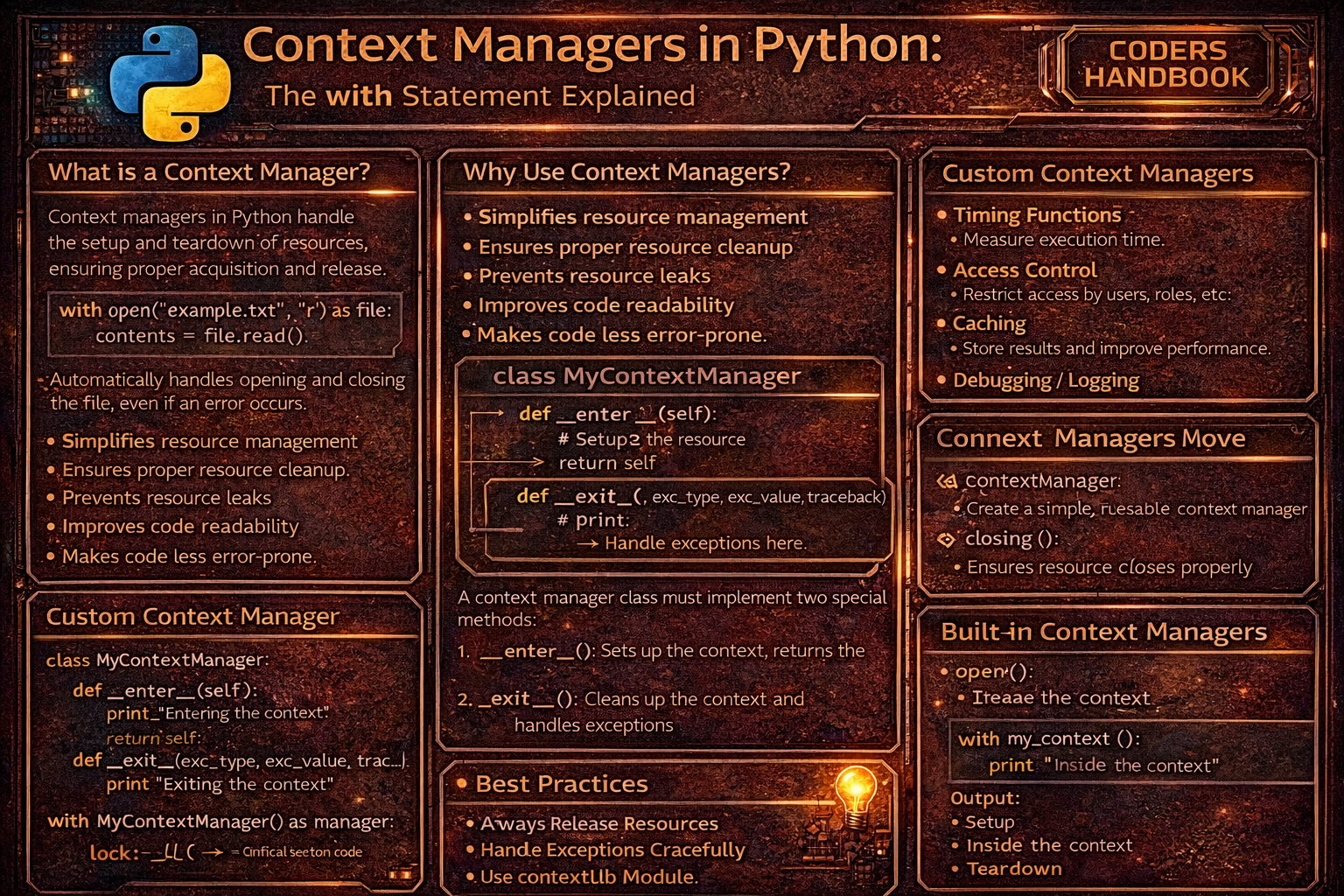
Context managers provide elegant resource management in Python ensuring proper acquisition and release of resources like files, network connections, locks, and database connections regardless of whether operations succeed or exceptions occur. The with statement implements the context manager protocol calling __enter__() when entering the context to acquire resources and __exit__() when leaving to release them, automatically handling cleanup even if errors interrupt execution. This pattern eliminates common resource leak bugs caused by forgotten close() calls or improper exception handling, replacing verbose try-finally blocks with concise, readable code that guarantees cleanup execution. Context managers separate resource lifecycle management from business logic, making code more maintainable while preventing issues like unclosed files consuming file descriptors, unreleased locks causing deadlocks, or orphaned database connections exhausting connection pools.
This comprehensive guide explores the with statement syntax providing clean resource management, the context manager protocol implementing __enter__() for setup and __exit__() for cleanup with exception handling parameters, creating custom context managers using classes defining both protocol methods, the contextlib.contextmanager decorator simplifying context manager creation through generator functions with yield separating setup from cleanup, exception handling within __exit__() controlling whether exceptions propagate or are suppressed by return values, multiple context managers in single with statements managing several resources, contextlib utilities including closing() wrapping objects with close() methods and suppress() ignoring specific exceptions, practical applications for file operations, database transactions, thread locks, timing code execution, temporary state changes, and API resource management, and best practices ensuring cleanup happens reliably, keeping context managers focused, using contextlib for simple cases, and documenting resource lifecycle expectations. Whether you're managing files, database connections, network sockets, thread synchronization primitives, temporary directory creation, transaction boundaries, or any resource requiring explicit cleanup, mastering context managers provides essential tools for writing robust Python code that handles resources safely preventing leaks and ensuring proper cleanup through declarative, maintainable patterns.
The with Statement
The with statement provides syntactic sugar for the context manager protocol, ensuring setup code runs before entering the block and cleanup code executes after leaving, even if exceptions occur. Common use cases include file operations where with automatically closes files, eliminating manual close() calls and preventing resource leaks. Understanding the with statement's execution flow reveals how Python manages resources systematically through the context manager protocol.
# The with Statement

# === Traditional file handling (error-prone) ===

# Without with statement (manual cleanup)
file = open('data.txt', 'r')
try:
    content = file.read()
    # Process content
finally:
    file.close()  # Must remember to close

# Problem: If you forget finally, file stays open!

# === Using with statement ===

# File automatically closed after block
with open('data.txt', 'r') as file:
    content = file.read()
    # Process content
# File is closed here automatically

# === What with does internally ===

# This with statement:
with open('data.txt', 'r') as file:
    content = file.read()

# Is equivalent to:
file = open('data.txt', 'r')
file_obj = file.__enter__()  # Returns self for files
try:
    content = file_obj.read()
finally:
    file.__exit__(None, None, None)  # Closes file

# === with statement guarantees cleanup ===

# Even if exception occurs, file is closed
try:
    with open('data.txt', 'r') as file:
        content = file.read()
        raise ValueError("Something went wrong")
        # File still closed despite exception!
except ValueError:
    print("Error occurred, but file was closed")

# === Writing to files ===

# Traditional way (error-prone)
file = open('output.txt', 'w')
try:
    file.write('Hello, World!')
finally:
    file.close()

# With context manager (clean)
with open('output.txt', 'w') as file:
    file.write('Hello, World!')
# File automatically closed and flushed

# === Multiple resources ===

# Multiple with statements (nested)
with open('input.txt', 'r') as infile:
    with open('output.txt', 'w') as outfile:
        content = infile.read()
        outfile.write(content.upper())

# Single with statement (Python 2.7+)
with open('input.txt', 'r') as infile, open('output.txt', 'w') as outfile:
    content = infile.read()
    outfile.write(content.upper())

# === Using as clause ===

# with ... as binds __enter__() return value
with open('data.txt', 'r') as file:
    print(type(file))  # <class '_io.TextIOWrapper'>
    # 'file' is what __enter__() returned

# without as clause (rare)
with open('data.txt', 'r'):
    # Can't access file object, but still properly closed
    pass

# === Common built-in context managers ===

# 1. File operations
with open('data.txt', 'r') as f:
    data = f.read()

# 2. Thread locks
import threading
lock = threading.Lock()
with lock:
    # Critical section
    # Lock automatically acquired and released
    pass

# 3. Decimal context
from decimal import Decimal, localcontext
with localcontext() as ctx:
    ctx.prec = 2  # Set precision
    result = Decimal('1.0') / Decimal('3.0')
    print(result)  # 0.33

# 4. Redirect stdout
import sys
from io import StringIO
buffer = StringIO()
with sys.stdout as old_stdout:
    sys.stdout = buffer
    print("This goes to buffer")
    sys.stdout = old_stdout
print(buffer.getvalue())

# === Benefits of with statement ===

# 1. Automatic resource cleanup
# 2. Exception safety
# 3. Cleaner, more readable code
# 4. Prevents resource leaks
# 5. No need to remember close() callsopen() and close(). Always use with open(...) as f: to guarantee files are closed, even if exceptions occur.Context Manager Protocol
The context manager protocol requires implementing __enter__() called when entering the with block to perform setup and return a resource object, and __exit__() called when leaving to perform cleanup and optionally handle exceptions through its three parameters. Creating custom context managers enables encapsulating resource management logic, providing reusable patterns for acquiring and releasing resources specific to your application domain while ensuring proper cleanup through Python's built-in mechanisms.
# Context Manager Protocol

# === Basic context manager class ===

class FileManager:
    """Simple file context manager."""

    def __init__(self, filename, mode):
        self.filename = filename
        self.mode = mode
        self.file = None

    def __enter__(self):
        """Called when entering with block."""
        print(f"Opening {self.filename}")
        self.file = open(self.filename, self.mode)
        return self.file  # This is bound to 'as' variable

    def __exit__(self, exc_type, exc_value, traceback):
        """Called when leaving with block."""
        print(f"Closing {self.filename}")
        if self.file:
            self.file.close()
        # Return False (or None) to propagate exceptions
        # Return True to suppress exceptions
        return False

# Usage
with FileManager('test.txt', 'w') as f:
    f.write('Hello, World!')
# Output:
# Opening test.txt
# Closing test.txt

# === Understanding __exit__ parameters ===

class DetailedContextManager:
    """Context manager showing exception handling."""

    def __enter__(self):
        print("Entering context")
        return self

    def __exit__(self, exc_type, exc_value, traceback):
        """
        exc_type: Exception class (or None)
        exc_value: Exception instance (or None)
        traceback: Traceback object (or None)
        """
        print("Exiting context")

        if exc_type is None:
            print("No exception occurred")
        else:
            print(f"Exception occurred: {exc_type.__name__}")
            print(f"Exception message: {exc_value}")

        return False  # Propagate exception

# No exception
with DetailedContextManager():
    print("Normal execution")
# Output:
# Entering context
# Normal execution
# Exiting context
# No exception occurred

# With exception
try:
    with DetailedContextManager():
        print("About to raise exception")
        raise ValueError("Something went wrong")
except ValueError:
    print("Exception caught outside")
# Output:
# Entering context
# About to raise exception
# Exiting context
# Exception occurred: ValueError
# Exception message: Something went wrong
# Exception caught outside

# === Suppressing exceptions ===

class SuppressErrors:
    """Context manager that suppresses all exceptions."""

    def __enter__(self):
        return self

    def __exit__(self, exc_type, exc_value, traceback):
        if exc_type is not None:
            print(f"Suppressing {exc_type.__name__}: {exc_value}")
        return True  # Suppress exception

# Exception is suppressed
with SuppressErrors():
    print("Before error")
    raise ValueError("This error is suppressed")
    print("After error")  # Not executed
print("Continuing after with block")
# Output:
# Before error
# Suppressing ValueError: This error is suppressed
# Continuing after with block

# === Database transaction manager ===

class DatabaseTransaction:
    """Context manager for database transactions."""

    def __init__(self, connection):
        self.connection = connection

    def __enter__(self):
        print("Beginning transaction")
        # Start transaction
        return self.connection

    def __exit__(self, exc_type, exc_value, traceback):
        if exc_type is None:
            print("Committing transaction")
            # self.connection.commit()
        else:
            print(f"Rolling back transaction due to {exc_type.__name__}")
            # self.connection.rollback()
        return False  # Propagate exceptions

# Successful transaction
class MockConnection:
    pass

with DatabaseTransaction(MockConnection()):
    print("Executing queries")
    # Queries succeed
# Output:
# Beginning transaction
# Executing queries
# Committing transaction

# Failed transaction
try:
    with DatabaseTransaction(MockConnection()):
        print("Executing queries")
        raise RuntimeError("Query failed")
except RuntimeError:
    print("Error handled")
# Output:
# Beginning transaction
# Executing queries
# Rolling back transaction due to RuntimeError
# Error handled

# === Timer context manager ===

import time

class Timer:
    """Measure execution time."""

    def __enter__(self):
        self.start = time.time()
        return self

    def __exit__(self, exc_type, exc_value, traceback):
        self.end = time.time()
        self.elapsed = self.end - self.start
        print(f"Elapsed time: {self.elapsed:.4f} seconds")
        return False

with Timer():
    time.sleep(0.5)
    print("Task completed")
# Output:
# Task completed
# Elapsed time: 0.5000 seconds

# === Temporary directory context manager ===

import os
import tempfile
import shutil

class TemporaryDirectory:
    """Create and cleanup temporary directory."""

    def __enter__(self):
        self.name = tempfile.mkdtemp()
        print(f"Created temp directory: {self.name}")
        return self.name

    def __exit__(self, exc_type, exc_value, traceback):
        print(f"Removing temp directory: {self.name}")
        shutil.rmtree(self.name)
        return False

with TemporaryDirectory() as tmpdir:
    print(f"Working in: {tmpdir}")
    # Create files in tmpdir
# Directory automatically deletedTrue from __exit__() to suppress exceptions, False (or None) to propagate them. Most context managers should return False unless specifically designed to suppress errors.The @contextmanager Decorator
The contextlib.contextmanager decorator simplifies creating context managers by converting generator functions into context managers, with code before yield acting as __enter__(), the yielded value bound to the as variable, and code after yield acting as __exit__(). This approach eliminates boilerplate of defining classes with __enter__() and __exit__() methods, making simple context managers more concise while maintaining all functionality including exception handling through try-finally blocks around yield.
# The @contextmanager Decorator

from contextlib import contextmanager
import time

# === Basic contextmanager ===

@contextmanager
def simple_context():
    """Simple context manager using decorator."""
    print("Entering context")
    yield  # Execution pauses here
    print("Exiting context")

with simple_context():
    print("Inside context")
# Output:
# Entering context
# Inside context
# Exiting context

# === Yielding a value ===

@contextmanager
def file_manager(filename, mode):
    """File context manager."""
    print(f"Opening {filename}")
    file = open(filename, mode)
    try:
        yield file  # This is bound to 'as' variable
    finally:
        print(f"Closing {filename}")
        file.close()

with file_manager('test.txt', 'w') as f:
    f.write('Hello, World!')
# Output:
# Opening test.txt
# Closing test.txt

# === Exception handling ===

@contextmanager
def error_handler():
    """Handle exceptions in context."""
    print("Setup")
    try:
        yield
    except ValueError as e:
        print(f"Caught ValueError: {e}")
        # Exception is suppressed (not re-raised)
    finally:
        print("Cleanup")

with error_handler():
    print("Doing work")
    raise ValueError("Something went wrong")
print("Continuing after with block")
# Output:
# Setup
# Doing work
# Caught ValueError: Something went wrong
# Cleanup
# Continuing after with block

# === Timer context manager ===

@contextmanager
def timer(name):
    """Time code execution."""
    start = time.time()
    yield
    elapsed = time.time() - start
    print(f"{name} took {elapsed:.4f} seconds")

with timer("Task"):
    time.sleep(0.5)
    print("Working...")
# Output:
# Working...
# Task took 0.5000 seconds

# === Temporary state change ===

import sys

@contextmanager
def redirect_stdout(new_target):
    """Temporarily redirect stdout."""
    old_target = sys.stdout
    sys.stdout = new_target
    try:
        yield
    finally:
        sys.stdout = old_target

from io import StringIO
buffer = StringIO()
with redirect_stdout(buffer):
    print("This goes to buffer")
print("This goes to stdout")
print(f"Buffer contents: {buffer.getvalue()}")

# === Working directory changer ===

import os

@contextmanager
def change_directory(path):
    """Temporarily change working directory."""
    old_dir = os.getcwd()
    os.chdir(path)
    try:
        yield
    finally:
        os.chdir(old_dir)

print(f"Original directory: {os.getcwd()}")
with change_directory('/tmp'):
    print(f"Inside with: {os.getcwd()}")
print(f"After with: {os.getcwd()}")

# === Database transaction ===

@contextmanager
def transaction(connection):
    """Database transaction context manager."""
    print("BEGIN TRANSACTION")
    try:
        yield connection
        print("COMMIT")
        # connection.commit()
    except Exception as e:
        print(f"ROLLBACK due to {e}")
        # connection.rollback()
        raise

class MockConnection:
    pass

# Successful transaction
with transaction(MockConnection()):
    print("Executing queries")
# Output:
# BEGIN TRANSACTION
# Executing queries
# COMMIT

# Failed transaction
try:
    with transaction(MockConnection()):
        print("Executing queries")
        raise RuntimeError("Query failed")
except RuntimeError:
    print("Exception propagated")
# Output:
# BEGIN TRANSACTION
# Executing queries
# ROLLBACK due to Query failed
# Exception propagated

# === Suppressing specific exceptions ===

@contextmanager
def suppress_exceptions(*exceptions):
    """Suppress specific exception types."""
    try:
        yield
    except exceptions as e:
        print(f"Suppressed {type(e).__name__}: {e}")

with suppress_exceptions(ValueError, KeyError):
    raise ValueError("This is suppressed")
print("Continuing")

# === Acquiring and releasing lock ===

import threading

@contextmanager
def locked(lock):
    """Acquire and release lock."""
    print("Acquiring lock")
    lock.acquire()
    try:
        yield
    finally:
        print("Releasing lock")
        lock.release()

my_lock = threading.Lock()
with locked(my_lock):
    print("Critical section")

# === As decorator (bonus feature) ===

@contextmanager
def trace_function():
    """Trace function execution."""
    print("Function starting")
    yield
    print("Function ending")

# Can be used as decorator!
@trace_function()
def my_function():
    print("Function body")

my_function()
# Output:
# Function starting
# Function body
# Function endingyield in try-finally to ensure cleanup code runs even if exceptions occur. Code after yield outside try-finally won't run if exceptions happen.contextlib Utilities
The contextlib module provides utilities simplifying context manager creation and usage. The closing() function wraps objects with close() methods making them context managers, suppress() ignores specified exceptions within its context, ExitStack manages multiple context managers dynamically, and nullcontext() provides a no-op context manager for conditional resource management. These utilities handle common patterns without implementing full context managers manually.
# contextlib Utilities

from contextlib import closing, suppress, ExitStack, nullcontext
import urllib.request

# === contextlib.closing() ===

# Wrap objects with close() method
with closing(urllib.request.urlopen('http://example.com')) as page:
    content = page.read()
# page.close() called automatically

# Custom object with close()
class Resource:
    def __init__(self, name):
        self.name = name
        print(f"Created {name}")

    def close(self):
        print(f"Closed {self.name}")

with closing(Resource("my_resource")) as res:
    print(f"Using {res.name}")
# Output:
# Created my_resource
# Using my_resource
# Closed my_resource

# === contextlib.suppress() ===

# Suppress specific exceptions
from contextlib import suppress

# Without suppress
try:
    with open('nonexistent.txt', 'r') as f:
        content = f.read()
except FileNotFoundError:
    pass  # Ignore

# With suppress (cleaner)
with suppress(FileNotFoundError):
    with open('nonexistent.txt', 'r') as f:
        content = f.read()
# FileNotFoundError silently suppressed

# Multiple exception types
with suppress(FileNotFoundError, PermissionError, IOError):
    with open('file.txt', 'r') as f:
        content = f.read()

# Practical use: Optional cleanup
import os
with suppress(FileNotFoundError):
    os.remove('temp_file.txt')  # Remove if exists, ignore if not

# === contextlib.ExitStack() ===

# Manage multiple context managers dynamically
with ExitStack() as stack:
    # Open multiple files
    files = [stack.enter_context(open(f'file{i}.txt', 'w'))
             for i in range(3)]

    for i, f in enumerate(files):
        f.write(f'Content {i}')
    # All files closed automatically

# Conditional context managers
def process_files(filenames, use_lock=False):
    import threading

    with ExitStack() as stack:
        # Optionally acquire lock
        if use_lock:
            lock = threading.Lock()
            stack.enter_context(locked(lock))  # Custom context manager

        # Open all files
        files = [stack.enter_context(open(fn, 'r')) for fn in filenames]

        # Process files
        for f in files:
            print(f.read())

# Dynamic resource management
def process_resources(resource_list):
    with ExitStack() as stack:
        resources = []
        for item in resource_list:
            if item.needs_processing:
                # Enter context only if needed
                resource = stack.enter_context(acquire_resource(item))
                resources.append(resource)

        # Process all acquired resources
        for resource in resources:
            resource.process()
    # All resources automatically cleaned up

# Callback registration
with ExitStack() as stack:
    # Register cleanup callbacks
    stack.callback(print, "Cleanup 1")
    stack.callback(print, "Cleanup 2")
    print("Main block")
# Output:
# Main block
# Cleanup 2
# Cleanup 1
# (callbacks executed in reverse order)

# === contextlib.nullcontext() ===

# No-op context manager for conditional logic
def process_data(data, use_file=False):
    # Use file or nullcontext based on condition
    cm = open('output.txt', 'w') if use_file else nullcontext()

    with cm as f:
        if use_file:
            f.write(str(data))
        else:
            print(data)

# Without file
process_data("Hello", use_file=False)  # Prints to console

# With file
process_data("Hello", use_file=True)   # Writes to file

# === Practical: Resource manager ===

class ResourcePool:
    """Pool of resources with context manager."""

    def __init__(self):
        self.resources = []

    def acquire(self):
        resource = f"Resource {len(self.resources)}"
        self.resources.append(resource)
        return closing(ResourceWrapper(resource, self))

    def release(self, resource):
        self.resources.remove(resource)
        print(f"Released {resource}")

class ResourceWrapper:
    def __init__(self, resource, pool):
        self.resource = resource
        self.pool = pool

    def close(self):
        self.pool.release(self.resource)

pool = ResourcePool()
with pool.acquire() as res:
    print(f"Using {res.resource}")
# Output:
# Using Resource 0
# Released Resource 0

# === Combining utilities ===

with ExitStack() as stack:
    # Suppress errors and manage multiple resources
    stack.enter_context(suppress(ValueError))

    # Open multiple files
    file1 = stack.enter_context(open('file1.txt', 'w'))
    file2 = stack.enter_context(open('file2.txt', 'w'))

    # Register cleanup
    stack.callback(print, "All done!")

    # Work with resources
    file1.write("Content 1")
    file2.write("Content 2")
# All resources cleaned up, errors suppressed
Best Practices
- Always use with for resources: Use context managers for any resource requiring cleanup: files, connections, locks, transactions. Never manually manage these resources
- Prefer @contextmanager for simple cases: Use the
@contextmanagerdecorator for simple context managers. Only create classes when you need state or complex logic - Ensure cleanup always happens: In
@contextmanager, wrapyieldin try-finally. In classes, ensure__exit__()performs cleanup regardless of exceptions - Return False from __exit__: Unless specifically suppressing exceptions, return
False(orNone) from__exit__()to propagate errors normally - Keep context managers focused: Each context manager should manage one resource or related group. Don't mix unrelated concerns in a single context manager
- Document resource lifecycle: Clearly document what resources are acquired in
__enter__()and released in__exit__() - Use contextlib utilities: Leverage
closing(),suppress(), andExitStack()instead of writing custom context managers for common patterns - Test exception handling: Test context managers with both successful execution and exceptions to ensure cleanup happens correctly in all cases
- Consider thread safety: If context manager manages shared resources, ensure thread-safe acquisition and release, especially with locks
- Make context managers reusable: Design context managers to be reusable across multiple with statements. Reset state appropriately if maintaining state
close(), release(), or cleanup method, manage it with a context manager. Never manually manage resource lifecycle—use with statements.Conclusion
Context managers provide elegant resource management in Python through the with statement implementing the context manager protocol, calling __enter__() when entering contexts to acquire resources and __exit__() when leaving to release them, guaranteeing cleanup execution even if exceptions occur. The with statement replaces verbose try-finally blocks with concise syntax automatically managing resource lifecycle, preventing common bugs like resource leaks from forgotten close() calls while making code more readable by separating resource management from business logic. Creating custom context managers requires implementing __enter__() for setup returning resource objects and __exit__() accepting exception parameters for cleanup and optional exception suppression through return values, enabling encapsulation of resource management patterns specific to application domains.
The contextlib.contextmanager decorator simplifies context manager creation by converting generator functions into context managers with code before yield acting as __enter__(), yielded values bound to as variables, and code after yield in finally blocks acting as __exit__(), eliminating boilerplate class definitions while maintaining full functionality. The contextlib module provides utilities including closing() wrapping objects with close() methods, suppress() ignoring specified exceptions, ExitStack() managing multiple context managers dynamically with conditional acquisition and callback registration, and nullcontext() providing no-op context managers for conditional logic. Practical applications demonstrate context managers' value for file operations guaranteeing closure, database transactions ensuring commits or rollbacks, thread locks preventing deadlocks through guaranteed release, timing code execution, temporary state changes restoring original values, working directory changes, stdout redirection, and any resource requiring explicit cleanup. Best practices emphasize always using with statements for resources requiring cleanup, preferring @contextmanager decorator for simple cases over class definitions, ensuring cleanup happens through try-finally blocks around yield or proper __exit__() implementation, returning False from __exit__() unless intentionally suppressing exceptions, keeping context managers focused on single resources, documenting resource lifecycle clearly, leveraging contextlib utilities for common patterns, testing exception handling verifying cleanup occurs in all scenarios, considering thread safety for shared resources, and designing reusable context managers resetting state appropriately. By mastering the with statement for clean resource management, context manager protocol implementing __enter__() and __exit__(), @contextmanager decorator for concise implementations, contextlib utilities handling common patterns, exception handling controlling propagation or suppression, and best practices ensuring reliable cleanup, you gain essential tools for writing robust Python code that manages resources safely preventing leaks, handling errors gracefully, and maintaining clean separation between resource lifecycle and business logic in professional software development.
$ share --platform
$ cat /comments/ (0)
$ cat /comments/
// No comments found. Be the first!


