Multi-threading in Python: Concurrent Programming Basics
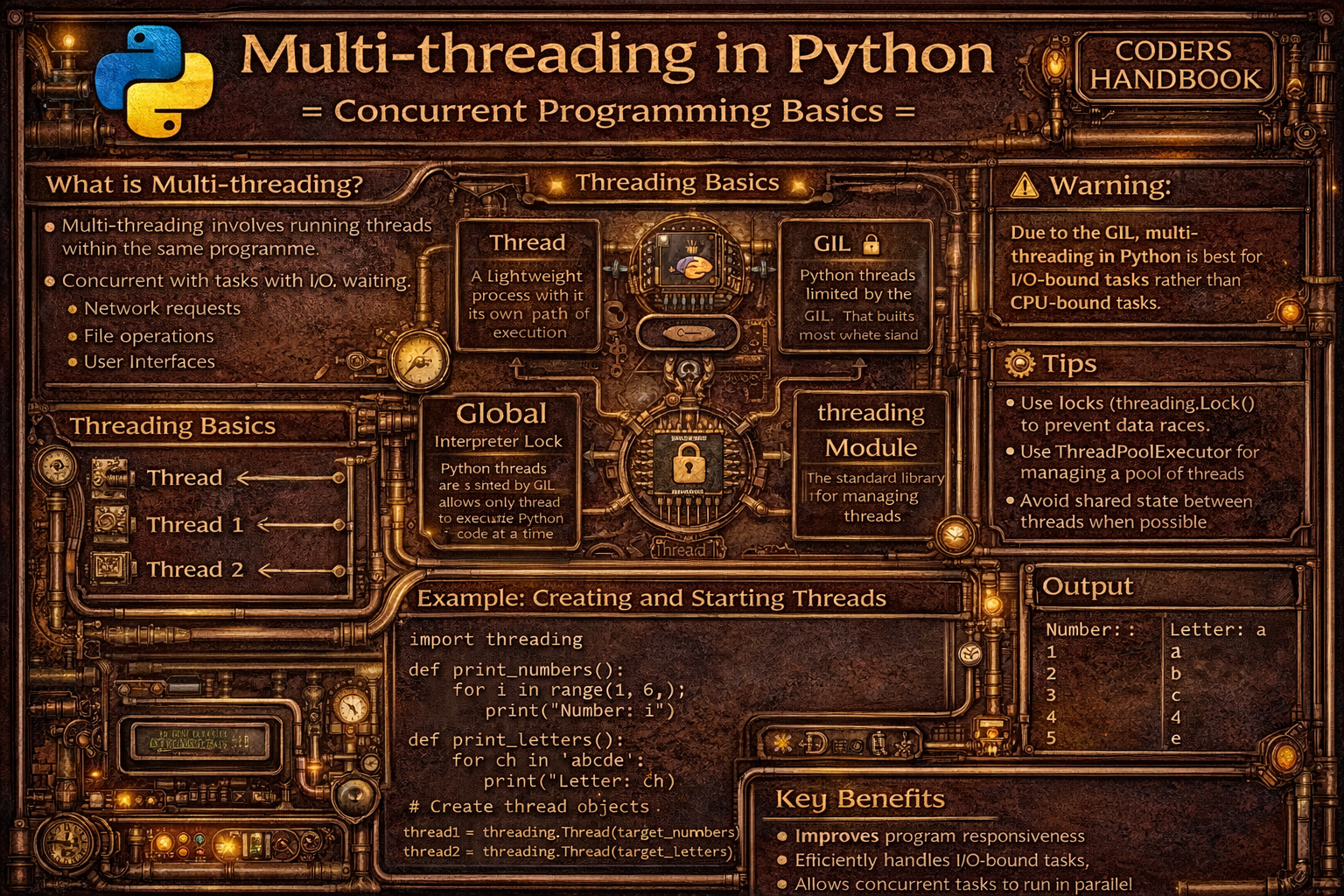
Multi-threading is a concurrent programming technique enabling multiple threads to run within a single process, allowing programs to perform multiple operations simultaneously. Threads are lightweight execution units sharing the same memory space enabling efficient communication, contrasting with processes which have separate memory spaces. Python's threading module provides high-level interfaces for creating and managing threads, supporting concurrent execution of I/O-bound tasks like network requests, file operations, or user interface responsiveness. However, the Global Interpreter Lock (GIL) in CPython prevents multiple threads from executing Python bytecode simultaneously, making threading effective for I/O-bound operations waiting on external resources but less beneficial for CPU-bound computational tasks requiring true parallelism.
This comprehensive guide explores creating threads using threading.Thread with target functions and arguments, starting threads with start() method initiating concurrent execution, joining threads with join() method waiting for completion, thread synchronization using Lock preventing race conditions when multiple threads access shared data, RLock enabling reentrant locking where same thread can acquire lock multiple times, Semaphore controlling access to limited resources with counter-based mechanisms, Event enabling thread coordination through signaling mechanisms, Queue providing thread-safe communication channels, daemon threads running in background terminating when main program exits, thread-local data storing thread-specific variables avoiding conflicts, the Global Interpreter Lock (GIL) limiting true parallelism in CPU-bound tasks, practical use cases including concurrent downloads, parallel API requests, and responsive user interfaces, and best practices using threading for I/O-bound tasks, multiprocessing for CPU-bound work, always synchronizing shared data access, avoiding deadlocks through consistent lock ordering, and using high-level abstractions like ThreadPoolExecutor. Whether you're building web scrapers downloading multiple pages simultaneously, implementing responsive desktop applications maintaining UI responsiveness, processing concurrent API requests, managing parallel I/O operations, or coordinating multiple background tasks, mastering threading provides essential tools for concurrent programming enabling efficient I/O-bound operations though understanding GIL limitations remains crucial for choosing appropriate concurrency strategies.
Creating and Managing Threads
Creating threads involves instantiating threading.Thread objects with target functions specifying code to execute and optional arguments passing parameters. The start() method launches thread execution running concurrently with the main program, while join() blocks until thread completes enabling synchronization. Understanding thread lifecycle including creation, execution, and termination enables effective concurrent programming.
# Creating and Managing Threads

import threading
import time

# === Basic thread creation ===

def print_numbers():
    """Function to run in thread."""
    for i in range(5):
        print(f"Number: {i}")
        time.sleep(0.5)

# Create thread
thread = threading.Thread(target=print_numbers)

# Start thread execution
thread.start()

print("Main thread continues...")

# Wait for thread to complete
thread.join()

print("Thread finished")

# === Thread with arguments ===

def greet(name, count):
    """Function with parameters."""
    for i in range(count):
        print(f"Hello, {name}! ({i+1})")
        time.sleep(0.3)

# Pass arguments to thread
thread1 = threading.Thread(target=greet, args=("Alice", 3))
thread2 = threading.Thread(target=greet, args=("Bob", 3))

# Start both threads
thread1.start()
thread2.start()

# Wait for both to complete
thread1.join()
thread2.join()

print("Both threads completed")

# === Thread with keyword arguments ===

def process_data(data, delay=1, verbose=False):
    if verbose:
        print(f"Processing {data}")
    time.sleep(delay)
    return f"Processed: {data}"

thread = threading.Thread(
    target=process_data,
    args=("dataset1",),
    kwargs={"delay": 0.5, "verbose": True}
)
thread.start()
thread.join()

# === Multiple threads ===

def worker(worker_id):
    """Worker function."""
    print(f"Worker {worker_id} starting")
    time.sleep(1)
    print(f"Worker {worker_id} finished")

# Create multiple threads
threads = []
for i in range(5):
    thread = threading.Thread(target=worker, args=(i,))
    threads.append(thread)
    thread.start()

# Wait for all threads
for thread in threads:
    thread.join()

print("All workers completed")

# === Thread subclassing ===

class WorkerThread(threading.Thread):
    """Custom thread class."""

    def __init__(self, name, duration):
        super().__init__()
        self.thread_name = name
        self.duration = duration

    def run(self):
        """Override run method."""
        print(f"{self.thread_name} starting")
        time.sleep(self.duration)
        print(f"{self.thread_name} finished")

# Create custom threads
t1 = WorkerThread("Task-1", 1)
t2 = WorkerThread("Task-2", 2)

t1.start()
t2.start()

t1.join()
t2.join()

# === Thread properties ===

def info_worker():
    thread = threading.current_thread()
    print(f"Thread name: {thread.name}")
    print(f"Thread ID: {thread.ident}")
    print(f"Is alive: {thread.is_alive()}")

thread = threading.Thread(target=info_worker, name="InfoWorker")
thread.start()
thread.join()

print(f"Thread is daemon: {thread.daemon}")

# === Daemon threads ===

def background_task():
    """Background daemon thread."""
    print("Daemon thread starting")
    time.sleep(10)  # Long-running task
    print("Daemon thread finished")  # Won't print

# Create daemon thread
daemon_thread = threading.Thread(target=background_task, daemon=True)
daemon_thread.start()

time.sleep(1)
print("Main thread exiting (daemon will terminate)")
# Program exits, daemon thread terminates

# === Thread with timeout ===

def long_task():
    time.sleep(5)
    print("Long task completed")

thread = threading.Thread(target=long_task)
thread.start()

# Wait up to 2 seconds
thread.join(timeout=2)

if thread.is_alive():
    print("Thread still running after timeout")
else:
    print("Thread completed")
start() to launch threads, not run(). start() creates new thread; run() executes in current thread.Thread Synchronization with Locks
Thread synchronization prevents race conditions occurring when multiple threads access shared data simultaneously causing unpredictable results. Lock objects provide mutual exclusion ensuring only one thread accesses critical sections at a time, with acquire() locking and release() unlocking, or using context managers for automatic lock management. Understanding synchronization mechanisms prevents data corruption and ensures thread-safe operations on shared resources.
# Thread Synchronization with Locks

import threading
import time

# === Race condition example (without lock) ===

shared_counter = 0

def increment_unsafe():
    """Unsafe increment (race condition)."""
    global shared_counter
    for _ in range(100000):
        shared_counter += 1

# Create threads
t1 = threading.Thread(target=increment_unsafe)
t2 = threading.Thread(target=increment_unsafe)

t1.start()
t2.start()
t1.join()
t2.join()

print(f"Unsafe counter: {shared_counter}")  # Not 200000! Race condition!

# === Using Lock for safety ===

shared_counter = 0
counter_lock = threading.Lock()

def increment_safe():
    """Safe increment with lock."""
    global shared_counter
    for _ in range(100000):
        counter_lock.acquire()
        try:
            shared_counter += 1
        finally:
            counter_lock.release()

t1 = threading.Thread(target=increment_safe)
t2 = threading.Thread(target=increment_safe)

t1.start()
t2.start()
t1.join()
t2.join()

print(f"Safe counter: {shared_counter}")  # 200000 - correct!

# === Using Lock with context manager ===

shared_list = []
list_lock = threading.Lock()

def add_items(items):
    """Add items to shared list safely."""
    for item in items:
        with list_lock:  # Automatic acquire and release
            shared_list.append(item)
            time.sleep(0.01)

t1 = threading.Thread(target=add_items, args=([1, 2, 3],))
t2 = threading.Thread(target=add_items, args=([4, 5, 6],))

t1.start()
t2.start()
t1.join()
t2.join()

print(f"Shared list: {shared_list}")

# === RLock (Reentrant Lock) ===

rlock = threading.RLock()

def recursive_function(count):
    """Function that acquires lock multiple times."""
    with rlock:
        print(f"Count: {count}")
        if count > 0:
            recursive_function(count - 1)  # Lock acquired again

thread = threading.Thread(target=recursive_function, args=(3,))
thread.start()
thread.join()

# === Semaphore (limited access) ===

semaphore = threading.Semaphore(3)  # Max 3 threads

def access_limited_resource(thread_id):
    """Access resource with limited slots."""
    print(f"Thread {thread_id} waiting for access")
    with semaphore:
        print(f"Thread {thread_id} accessing resource")
        time.sleep(2)
        print(f"Thread {thread_id} releasing resource")

threads = []
for i in range(6):
    t = threading.Thread(target=access_limited_resource, args=(i,))
    threads.append(t)
    t.start()

for t in threads:
    t.join()

# === Event for signaling ===

event = threading.Event()

def waiter():
    """Wait for event signal."""
    print("Waiter: Waiting for event...")
    event.wait()  # Block until event is set
    print("Waiter: Event received!")

def setter():
    """Set event after delay."""
    time.sleep(2)
    print("Setter: Setting event")
    event.set()  # Signal waiting threads

t1 = threading.Thread(target=waiter)
t2 = threading.Thread(target=setter)

t1.start()
t2.start()
t1.join()
t2.join()

# === Condition variable ===

condition = threading.Condition()
data_ready = False

def consumer():
    """Wait for data to be ready."""
    with condition:
        print("Consumer: Waiting for data")
        condition.wait()  # Wait for notification
        print("Consumer: Data received")

def producer():
    """Produce data and notify."""
    global data_ready
    time.sleep(1)
    with condition:
        data_ready = True
        print("Producer: Data ready, notifying")
        condition.notify()  # Wake up waiting thread

t1 = threading.Thread(target=consumer)
t2 = threading.Thread(target=producer)

t1.start()
t2.start()
t1.join()
t2.join()

# === Barrier for synchronization points ===

barrier = threading.Barrier(3)

def worker_with_barrier(worker_id):
    """Worker that waits at barrier."""
    print(f"Worker {worker_id} doing initial work")
    time.sleep(worker_id)  # Different durations

    print(f"Worker {worker_id} waiting at barrier")
    barrier.wait()  # All threads must reach here

    print(f"Worker {worker_id} proceeding after barrier")

threads = []
for i in range(3):
    t = threading.Thread(target=worker_with_barrier, args=(i,))
    threads.append(t)
    t.start()

for t in threads:
t.join()Thread-Safe Communication with Queue
The queue.Queue class provides thread-safe FIFO queue enabling safe communication between threads without explicit locking. Producer threads add items with put() while consumer threads retrieve items with get(), with Queue handling synchronization internally. Queue supports blocking operations waiting for items or space, timeouts preventing indefinite waits, and task tracking with task_done() and join() enabling coordination.
# Thread-Safe Communication with Queue

import threading
import queue
import time
import random

# === Basic producer-consumer pattern ===

work_queue = queue.Queue()

def producer(queue, items):
    """Produce items and add to queue."""
    for item in items:
        print(f"Producer: Adding {item} to queue")
        queue.put(item)
        time.sleep(0.5)
    print("Producer: Done")

def consumer(queue, consumer_id):
    """Consume items from queue."""
    while True:
        try:
            item = queue.get(timeout=2)
            print(f"Consumer {consumer_id}: Processing {item}")
            time.sleep(1)  # Simulate processing
            queue.task_done()
        except queue.Empty:
            print(f"Consumer {consumer_id}: Queue empty, exiting")
            break

# Create threads
producer_thread = threading.Thread(
    target=producer,
    args=(work_queue, [1, 2, 3, 4, 5])
)
consumer1 = threading.Thread(target=consumer, args=(work_queue, 1))
consumer2 = threading.Thread(target=consumer, args=(work_queue, 2))

# Start threads
producer_thread.start()
consumer1.start()
consumer2.start()

# Wait for completion
producer_thread.join()
work_queue.join()  # Wait for all tasks to be processed
print("All tasks completed")

# === Queue with size limit ===

limited_queue = queue.Queue(maxsize=3)

def producer_with_limit(queue):
    """Producer with limited queue."""
    for i in range(10):
        print(f"Producing item {i}")
        queue.put(i)  # Blocks if queue is full
        print(f"Item {i} added")

def consumer_with_limit(queue):
    """Consumer processing items."""
    while True:
        item = queue.get()
        if item is None:  # Sentinel value
            break
        print(f"Consuming item {item}")
        time.sleep(1)  # Slow consumer
        queue.task_done()

p_thread = threading.Thread(target=producer_with_limit, args=(limited_queue,))
c_thread = threading.Thread(target=consumer_with_limit, args=(limited_queue,))

p_thread.start()
c_thread.start()

p_thread.join()
limited_queue.put(None)  # Sentinel to stop consumer
c_thread.join()

# === Priority Queue ===

priority_queue = queue.PriorityQueue()

def priority_producer():
    """Add items with priorities."""
    tasks = [
        (3, "Low priority task"),
        (1, "High priority task"),
        (2, "Medium priority task"),
    ]
    for priority, task in tasks:
        priority_queue.put((priority, task))
        print(f"Added: {task} (priority {priority})")

def priority_consumer():
    """Process items by priority."""
    while not priority_queue.empty():
        priority, task = priority_queue.get()
        print(f"Processing: {task}")
        priority_queue.task_done()

p_thread = threading.Thread(target=priority_producer)
c_thread = threading.Thread(target=priority_consumer)

p_thread.start()
p_thread.join()
c_thread.start()
c_thread.join()

# === LIFO Queue (Stack) ===

lifo_queue = queue.LifoQueue()

for i in range(5):
    lifo_queue.put(i)

print("LIFO Queue (Last In, First Out):")
while not lifo_queue.empty():
    print(lifo_queue.get())  # 4, 3, 2, 1, 0

# === Practical example: Web scraper ===

url_queue = queue.Queue()
results = []
results_lock = threading.Lock()

def fetch_url(url):
    """Simulate fetching URL."""
    time.sleep(random.uniform(0.5, 1.5))
    return f"Content from {url}"

def worker():
    """Worker thread fetching URLs."""
    while True:
        try:
            url = url_queue.get(timeout=1)
            print(f"Fetching {url}")
            content = fetch_url(url)

            with results_lock:
                results.append(content)

            url_queue.task_done()
        except queue.Empty:
            break

# Add URLs to queue
urls = [f"http://example.com/page{i}" for i in range(10)]
for url in urls:
    url_queue.put(url)

# Create worker threads
workers = []
for _ in range(3):
    t = threading.Thread(target=worker)
    t.start()
    workers.append(t)

# Wait for all URLs to be processed
url_queue.join()

# Wait for workers to finish
for t in workers:
    t.join()

print(f"\nFetched {len(results)} URLs")
Understanding the Global Interpreter Lock
The Global Interpreter Lock (GIL) is a mutex in CPython preventing multiple threads from executing Python bytecode simultaneously, ensuring thread-safe memory management but limiting true parallelism. The GIL means threading provides concurrency for I/O-bound tasks but not parallelism for CPU-bound tasks, as only one thread executes Python code at a time. Understanding GIL limitations guides choosing threading for I/O operations or multiprocessing for CPU-intensive computations requiring true parallel execution.
# Understanding the Global Interpreter Lock (GIL)

import threading
import time
import requests

# === CPU-bound task (GIL limits performance) ===

def cpu_bound_task(n):
    """CPU-intensive computation."""
    count = 0
    for i in range(n):
        count += i ** 2
    return count

# Single-threaded execution
start = time.time()
result1 = cpu_bound_task(10000000)
result2 = cpu_bound_task(10000000)
single_time = time.time() - start
print(f"Single-threaded CPU task: {single_time:.2f}s")

# Multi-threaded execution (not faster due to GIL!)
start = time.time()
thread1 = threading.Thread(target=cpu_bound_task, args=(10000000,))
thread2 = threading.Thread(target=cpu_bound_task, args=(10000000,))
thread1.start()
thread2.start()
thread1.join()
thread2.join()
multi_time = time.time() - start
print(f"Multi-threaded CPU task: {multi_time:.2f}s")
print(f"Speedup: {single_time / multi_time:.2f}x (not 2x due to GIL!)")

# === I/O-bound task (threading helps) ===

def io_bound_task(url):
    """I/O-intensive operation."""
    time.sleep(1)  # Simulate I/O (releases GIL)
    return f"Fetched {url}"

urls = [f"http://example.com/{i}" for i in range(5)]

# Single-threaded I/O
start = time.time()
for url in urls:
    io_bound_task(url)
single_io_time = time.time() - start
print(f"\nSingle-threaded I/O: {single_io_time:.2f}s")

# Multi-threaded I/O (much faster!)
start = time.time()
threads = []
for url in urls:
    t = threading.Thread(target=io_bound_task, args=(url,))
    threads.append(t)
    t.start()

for t in threads:
    t.join()

multi_io_time = time.time() - start
print(f"Multi-threaded I/O: {multi_io_time:.2f}s")
print(f"Speedup: {single_io_time / multi_io_time:.2f}x (significant!)")

# === When GIL is released ===

print("\nOperations that release GIL:")
print("- I/O operations (file, network)")
print("- time.sleep()")
print("- NumPy operations (C extensions)")
print("- Database queries")
print("- Image processing (Pillow)")

print("\nOperations that hold GIL:")
print("- Pure Python computations")
print("- List/dict operations")
print("- String processing")
print("- Mathematical calculations")

# === Threading vs Multiprocessing ===

print("\n=== Use Threading For: ===")
print("✓ I/O-bound tasks")
print("✓ Network requests")
print("✓ File operations")
print("✓ Database queries")
print("✓ GUI applications")
print("✓ Tasks waiting on external resources")

print("\n=== Use Multiprocessing For: ===")
print("✓ CPU-bound tasks")
print("✓ Heavy computations")
print("✓ Data processing")
print("✓ Image/video processing")
print("✓ Scientific computing")
print("✓ Tasks needing true parallelism")

# === ThreadPoolExecutor (easier threading) ===

from concurrent.futures import ThreadPoolExecutor

def fetch_url_simulation(url):
    time.sleep(0.5)
    return f"Content from {url}"

urls = [f"http://example.com/{i}" for i in range(10)]

# Using ThreadPoolExecutor
start = time.time()
with ThreadPoolExecutor(max_workers=5) as executor:
    results = list(executor.map(fetch_url_simulation, urls))

pool_time = time.time() - start
print(f"\nThreadPoolExecutor: {pool_time:.2f}s")
print(f"Fetched {len(results)} URLs")Multi-threading Best Practices
- Use threading for I/O-bound tasks: Threading excels at I/O operations like network requests, file operations, or database queries where threads wait for external resources
- Use multiprocessing for CPU-bound tasks: For computationally intensive work, use multiprocessing module bypassing GIL with separate processes achieving true parallelism
- Always synchronize shared data: Protect any data accessed by multiple threads with locks, queues, or other synchronization primitives preventing race conditions
- Use context managers for locks: Always use
with lock:syntax ensuring locks are released even if exceptions occur preventing deadlocks - Prefer Queue over shared variables: Use
queue.Queuefor thread communication instead of shared variables with manual locking for cleaner, safer code - Avoid deadlocks with lock ordering: When using multiple locks, acquire them in consistent order across all threads preventing circular wait conditions
- Use ThreadPoolExecutor for simplicity: Use
concurrent.futures.ThreadPoolExecutorproviding higher-level interface managing thread pools automatically - Set daemon threads appropriately: Use daemon threads for background tasks that should terminate when main program exits, not for critical cleanup operations
- Handle exceptions in threads: Catch exceptions within thread functions. Unhandled exceptions in threads don't crash main program but may silently fail
- Limit thread count: Don't create thousands of threads. Use thread pools with reasonable worker counts (typically 2-10x CPU cores for I/O tasks)
threading.enumerate() to list active threads, thread.is_alive() to check status, and logging to trace execution. Threading bugs are hard to reproduce!Conclusion
Multi-threading enables concurrent execution within single processes using lightweight threads sharing memory space, with Python's threading module providing high-level interfaces through threading.Thread objects created with target functions and optional arguments. Creating threads involves instantiating Thread objects and calling start() method initiating concurrent execution, with join() method blocking until thread completes enabling synchronization and daemon threads running in background terminating when main program exits. Thread synchronization prevents race conditions through Lock objects providing mutual exclusion with acquire() and release() methods or context managers for automatic management, RLock enabling reentrant locking where same thread acquires lock multiple times, Semaphore controlling limited resource access with counters, Event enabling signaling between threads, and Condition variables coordinating complex waiting patterns.
The queue.Queue class provides thread-safe FIFO communication between producer and consumer threads handling synchronization internally, supporting blocking operations waiting for items or space, priority queues processing items by priority, and LIFO queues implementing stack behavior. The Global Interpreter Lock (GIL) in CPython prevents multiple threads from executing Python bytecode simultaneously ensuring thread-safe memory management but limiting true parallelism, making threading effective for I/O-bound tasks where threads spend time waiting on external resources releasing GIL but less beneficial for CPU-bound computations requiring multiprocessing for true parallel execution. Best practices emphasize using threading for I/O-bound operations like network requests and file operations, multiprocessing for CPU-bound computations bypassing GIL, always synchronizing shared data with locks or queues preventing race conditions, using context managers for automatic lock release, preferring Queue over manual synchronization, avoiding deadlocks through consistent lock ordering, using ThreadPoolExecutor for simplified thread management, setting daemon threads appropriately for background tasks, handling exceptions within threads preventing silent failures, and limiting thread counts using pools. By mastering thread creation and lifecycle management, lock-based synchronization preventing race conditions, queue-based communication enabling safe producer-consumer patterns, understanding GIL limitations guiding technology choices, and best practices ensuring robust concurrent code, you gain essential tools for concurrent programming enabling efficient I/O-bound operations, responsive applications maintaining UI interactivity, parallel network requests, and coordinated background tasks supporting professional Python development though always remembering GIL constraints when considering threading for computational workloads.
$ share --platform
$ cat /comments/ (0)
$ cat /comments/
// No comments found. Be the first!


